Home Server Gifts Under $50 (2026): 20 Ideas by Budget
The best tech gift under $50 for a home server nerd is a five-port 2.5GbE switch, because nearly every modern NAS and mini PC has a 2.5GbE port that is stuck at gigabit for lack of a switch, and the difference shows on the first large transfer. A plug-in power meter, a label maker, a two-bay drive dock and a quiet 120 mm Noctua fan are the next four, and everything on this page fits any rack and was confirmed in stock when researched.
Under fifty dollars, the useful question is not how much to spend but what the recipient's rack is missing, because it is almost always missing something small. The TP-Link TL-SG105S-M2 leads this list for that reason: nearly every NAS and mini PC sold in the last few years has a 2.5GbE port that is running at gigabit because nothing on the other end matches it. The other nineteen are grouped into network, drives and storage, and rack and tidiness, so you can shop for the gap rather than the price.
As an Amazon Associate we earn from qualifying purchases. Prices change often, confirm on Amazon. How affiliate links work here.
Quick picks under $50
Every gift on this page is in the under $50 tier. These are the first picks of each type, with the full list in each section below.
| Type | Pick | Best for |
|---|---|---|
| Network | TP-Link TL-SG105S-M2 | Any modern NAS owner |
| Network | Cable Matters 12-port patch panel | Anyone with a rack |
| Drives and storage | PNY CS900 250GB | Booting a repurposed desktop from flash |
| Drives and storage | Sabrent dual-bay dock | Burn-in, cloning and drive recovery |
| Rack and tidiness | Kill A Watt Connect | Everyone with a rack |
| Rack and tidiness | Brother PTD220 | Anyone with more than one cable |
Shipping note: Order early for the holidays; popular items sell out around Black Friday. Hard drives and NAS units ship separately from many sellers, so leave extra time if you are pairing them.
How to choose from this list
Start with one question: storage or services? A recipient whose server is a NAS full of photos and media wants the drive tools, the switch and the backup-adjacent gifts. A recipient who runs containers on a mini PC or a Pi wants the fan, the case, the smart plug and the boot SSD. If you do not know, the rack group is the safe tier, because a power meter and a label maker are used by everyone who owns more than one cable.
Second, think in kits. Three items from one group is a more coherent gift than one from each, and the pairings are called out under each section. The buying order guide is the page to send if you want the recipient to tell you what they need.
Network: the gifts that make everything faster
The cheapest speed upgrade in home storage is not a drive, it is the link. The networking basics guide explains why a gigabit port caps a NAS at about 113 megabytes per second no matter what is inside it; these are the parts of that guide you can put in a box.
| Gift | What it fixes | Who it is for |
|---|---|---|
| TP-Link TL-SG105S-M2 | Gigabit as the bottleneck | Any modern NAS owner |
| Cable Matters 12-port patch panel | Cables that cannot be traced | Anyone with a rack |
| UGREEN USB 2.5GbE adapter | A gigabit-only desktop or laptop | The other end of the switch |
| NETGEAR GS308E | Smart plugs on the same network as the NAS | VLAN beginners |
| Klein VDV526-100 tester | The mystery slow link | Anyone who has run their own cable |
| CableGeeker Cat 6A 5-pack | Six feet of coiled cable | Everyone |
Network

TP-Link TL-SG105S-M2 5-Port 2.5G Unmanaged Switch
A five-port 2.5GbE switch that costs less than a fast USB stick. Plug the NAS and one desktop into it and the transfer that ran at gigabit runs at two and a half times that. The upgrade a recipient notices on day one.
Check price
Cable Matters 12-Port 10Gbps Mini Vertical Patch Panel
A twelve-port keystone patch panel in a ten-inch vertical form factor. The step from cables shoved into a switch to a rack that can be traced, and it mounts without a full-width rack.
Check price
UGREEN USB to 2.5GbE Ethernet Adapter
A USB 2.5GbE adapter for the laptop or mini PC that only has gigabit. The other half of the switch above, so the fast link actually has two fast ends.
Check price
NETGEAR GS308E 8-Port Gigabit Smart Managed Switch
An eight-port gigabit switch with VLAN support and a web interface. For the homelab owner who has started separating cameras and smart plugs from the rest of the network.
Check price
Klein Tools VDV526-100 LAN Cable Tester
A tester that confirms every pair on a run before the rack goes back together. The tool that turns a mystery slow link into a bad crimp in thirty seconds.
Check price
CableGeeker Cat 6A Slim Patch Cables, 3 ft, 5-Pack
Five slim Cat 6A cables at three feet, rated for 10GbE. The right length for the switch-to-NAS run that most people bridge with six feet of cable coiled on the floor.
Check priceBudgets are ranges; check the current price on Amazon. As an Amazon Associate we earn from qualifying purchases.
The TL-SG105S-M2 and the UGREEN adapter with a pack of the Cat 6A cables make a complete network kit for under $100, and it is the best gift on this site for someone whose NAS is newer than their switch. The 2.5GbE switch roundup covers the eight-port step up, and the throughput calculator shows how long a transfer takes at each link speed, which is the number to quote when the recipient asks why you bought them a switch.
Drives and storage: the tools every array owner needs
A drive dock, a SATA cable and an enclosure are not exciting, and they are the three things that get used the day a drive fails. The burn-in guide explains why a new drive should be tested outside the array before it joins one, which needs one of the first two.
| Gift | What it does | Who it is for |
|---|---|---|
| PNY CS900 250GB | Boots a repurposed desktop or mini PC from flash | DIY server owners |
| Sabrent dual-bay dock | Burn-in, cloning, reading a drive from a dead box | Every array owner |
| SanDisk Extreme 128GB microSD | Boot card for a Pi, spare for a camera | Pi owners |
| SanDisk Ultra Fit 128GB | Installer and recovery drive | Everyone |
| UGREEN SATA to USB adapter | Reads a bare drive on a table | Anyone without a dock |
| UGREEN NVMe enclosure | Turns a spare M.2 into a portable disk | Everyone |
Drives and storage

PNY CS900 250GB SATA III SSD
A 250 GB SATA SSD, which is exactly the boot drive a repurposed desktop or a mini PC server wants. Cheap enough to give and the reason the machine stops booting from a ten-year-old hard drive.
Check price
SABRENT USB 3.0 Dual Bay Hard Drive Docking Station
A two-bay USB 3.0 dock for bare 2.5 and 3.5 inch drives. Burn-in for new drives, cloning for old ones and a way to read a disk out of a dead box. The one tool every array owner ends up needing.
Check price
SanDisk 128GB Extreme microSDXC UHS-I with Adapter
A 128 GB A2-rated microSD card. The boot card for a Raspberry Pi, the card for a dash camera or a security camera, and the spare every Pi owner wishes they had when the first one fails.
Check price
SanDisk 128GB Ultra Fit USB 3.2 Flash Drive
A 128 GB low-profile USB 3.2 stick. The installer drive for the next operating system, the recovery key for the NAS, and the thing that lives permanently in a server port as a boot device.
Check price
UGREEN SATA to USB 3.0 Adapter Cable, 2.5 and 3.5 Inch
A SATA to USB 3.0 cable with its own power supply for 3.5 inch drives. Cheaper than the dock, and enough to read or wipe a drive on the kitchen table.
Check price
UGREEN Tool-Free USB-C NVMe Enclosure, 10Gbps
A tool-free USB-C enclosure that turns a spare M.2 drive into a fast portable disk. Every homelab has one of those drives in a drawer.
Check priceBudgets are ranges; check the current price on Amazon. As an Amazon Associate we earn from qualifying purchases.
The Sabrent dock is the one to buy if you buy one. It takes two bare drives at once, which is what cloning needs, and it is how a drive gets a full surface test before it goes into a NAS. The NAS drive roundup is the page to send with it if the recipient is about to build an array, and the rebuild time chart explains why testing a drive first matters more as capacities grow. The PNY CS900 is a different kind of gift: the HDD versus SSD comparison explains why flash is the wrong place for bulk storage and exactly the right place for the operating system, and 250 GB is all a boot drive needs.
Rack and tidiness: gifts that make a server pleasant to own
Nobody buys a label maker for themselves. Everybody who receives one labels the whole rack that weekend. This group is the small hardware that turns a working server into a maintained one.
| Gift | What it replaces | Who it is for |
|---|---|---|
| Kill A Watt Connect | Guessing the running cost | Everyone with a rack |
| Brother PTD220 | Tape and a marker | Anyone with more than one cable |
| Noctua NF-A12x25 | The fan they hear from the sofa | Servers in living spaces |
| StarTech 1U vented shelf | The mini PC on top of the rack | Rack owners |
| Argon NEO 5 case | A bare Pi 5 throttling in summer | Pi 5 owners |
| Sabrent powered USB hub | One free port, four devices | Mini PC owners |
| Kasa KP115 | Walking to the rack to reboot | Anyone with a box that hangs |
| VELCRO ties, 150-pack | Zip ties that get cut every change | Everyone |
Rack and tidiness

Kill A Watt Connect P4498 Electricity Usage Monitor
A plug-in power meter with an app. It ends the argument about what the rack costs to run, and it feeds real watts into the power draw calculator instead of a guess.
Check price
Brother P-Touch PTD220 Label Maker
A label maker that prints laminated tape. Every cable, drive sled and patch port in a rack that can be maintained has a label, and this is how it gets one.
Check price
Noctua NF-A12x25 PWM 120 mm Fan
The 120 mm fan that owner reviews consistently rate as the quietest at a given airflow. For the server that lives in the room where someone sleeps.
Check price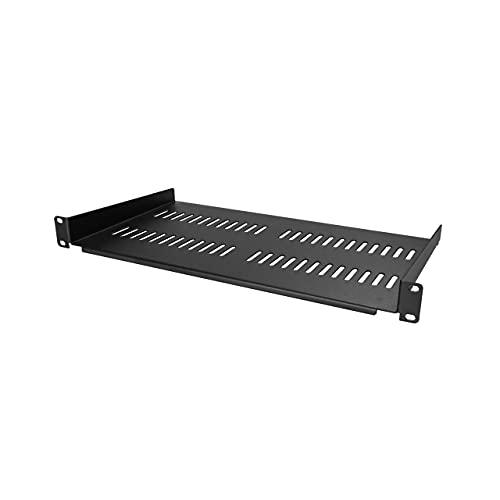
StarTech 1U Vented Rack Shelf, 10 in Deep
A vented 1U cantilever shelf. It gives the mini PC, the modem and the Pi a place in the rack instead of on top of it, and it takes forty-four pounds.
Check price
Argon NEO 5 Aluminum Case for Raspberry Pi 5 with Fan
An aluminium Raspberry Pi 5 case with a built-in fan. The case for the Pi that has been running naked on a shelf and throttling in summer.
Check price
Sabrent 4-Port Powered USB 3.0 Hub with Switches
A powered four-port USB 3.0 hub with a switch per port. For the server that has one spare USB port and four things that want it.
Check price
Kasa Smart Plug Mini with Energy Monitoring, KP115
A smart plug with energy monitoring. The mini PC that hangs once a month gets a remote power cycle, and reports its own watts while it is at it.
Check price
VELCRO Brand Reusable Cable Ties, 8 in, 150-Pack
A hundred and fifty reusable cable ties. The difference between a rack and a pile, and the reason the next change takes ten minutes.
Check priceBudgets are ranges; check the current price on Amazon. As an Amazon Associate we earn from qualifying purchases.
The power meter is the sleeper on this list. Plug the rack through it for a week and the power draw calculator turns the reading into a yearly cost; the power consumption guide explains why the drives, not the processor, are usually the answer. The Noctua fan is for the server that lives in a bedroom or a living room, and the rack unit calculator is the page for anyone about to receive the 1U shelf and wondering what else fits. The Kasa plug pairs with the UPS comparison: it is not a UPS and it will not save an array from an outage, but it will reboot a hung mini PC from a phone.
Under-$50 kits by recipient
- The network kit: TL-SG105S-M2, UGREEN 2.5GbE adapter and Cat 6A cables. Two and a half times faster on the first transfer.
- The drive kit: Sabrent dock, SATA adapter and NVMe enclosure. Every drive they own, readable.
- The tidy-rack kit: Brother PTD220, VELCRO ties and patch panel.
- The Pi kit: Argon NEO 5 case and Extreme 128GB microSD. A cool Pi with a fast, spare card.
- The quiet kit: Noctua NF-A12x25 and Kasa KP115. Silent, and rebootable from the sofa.
- The person you know nothing about: Kill A Watt Connect and Ultra Fit 128GB. Used by anyone with a plug and a port.
If the budget stretches past fifty dollars, the full gift guide ranks 25 gifts from a four-bay NAS and 20 TB drives down, and the one big home server gift matches the big purchases to how the recipient uses their server.
Everything on this page is researched guidance based on published manufacturer specifications and verified owner reviews. We do not test hardware in person. A smart plug is not a UPS and RAID is not a backup. Prices and stock change often; confirm on the product page before ordering.
Frequently asked questions
What is the best tech gift under $50 for someone with a home server?
A five-port 2.5GbE switch, because almost every NAS and mini PC sold in the last few years has a 2.5GbE port that is running at gigabit for lack of a switch to match it, and the upgrade is noticed on the first large transfer. If they already have one, a plug-in power meter or a label maker are the two gifts that get used most, because nobody buys them for themselves.
Which of these gifts work without knowing their setup?
The power meter, the label maker, the cable ties, the patch cables, the cable tester, the USB stick, the microSD card, the NVMe enclosure, the SATA adapter, the drive dock, the smart plug and the USB hub fit any home server. The switches assume they have Ethernet ports free, the SSD assumes a SATA machine, and the Pi case and rack shelf assume they own a Pi or a rack, so check those.
Is a 2.5GbE switch worth it if their NAS only has gigabit?
Not yet. A 2.5GbE switch is backward compatible and will work, but the speed benefit only appears when both ends have 2.5GbE ports. Check the NAS model on the specs pages here; most enclosures released in the last three years have at least one 2.5GbE port, and a USB 2.5GbE adapter fixes the desktop side for under thirty dollars.
Can I combine several of these into one bigger gift?
That is the best use of this list. The network kit is the 2.5GbE switch, the USB adapter and the patch cables. The drive kit is the dock, the SATA adapter and the NVMe enclosure. The tidy-rack kit is the label maker, the cable ties and the patch panel. Three items with one purpose is a better gift than three unrelated ones.
Are any of these a bad idea for a beginner?
The patch panel and the rack shelf assume a rack, and the managed gigabit switch assumes someone who wants VLANs. For a beginner or someone whose whole server is a two-bay NAS, the power meter, the drive dock, the USB stick and the 2.5GbE switch are the safe picks, and the Raspberry Pi case is right for anyone who has a Pi.
How we choose: we compare published manufacturer specifications, drive datasheets, published reliability statistics and verified owner reviews. We do not test hardware in person, and we are not tied to any NAS vendor. Capacity and power figures here are researched guidance, not a warranty. RAID protects against drive failure, not against deletion, ransomware, fire or theft, so keep verified backups regardless of what any calculator tells you.